Custom Message in Calculator
This is an example in which we will show a custom text message in the calculator, like in the example shown below:
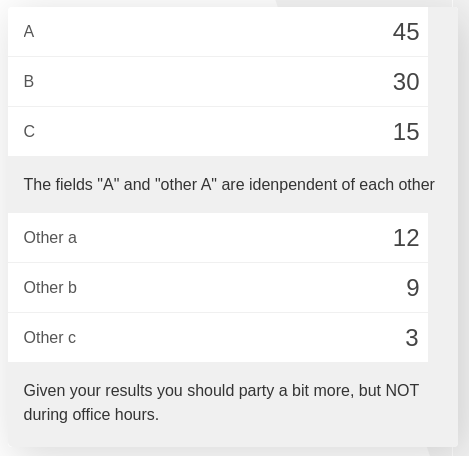
The messages can be static (always the same) or dynamic (reacting to user input), and they can be located anywhere in the calculator.
For our first example we will look at the simplest version: the static message that is always shown.
See also
We have created a calculator using this code so that you can see the results for yourself. Check it out at Custom Message on BB
Static messages
In this example we will make a custom message for our calculator. It will appear after the variable named c. The message will always been shown no matter what happened with the variable c.
1 2 3 4 5 6 | 'use strict';
omni.onResult(function(ctx){
ctx.addTextInfo('The fields "A" and "other A" are idenpendent of each other',
{afterVariable: 'c'}
);
});
|
Note
For the message to be shown at all times we need to trigger onResult from the beginig. We can do that by setting default values on our variables.
This kind of message is typically used as a second title for the calculator, mostly when the variable above switches between different behaviours in the calculator. It can also be used as an alternative to Text row before to separate variables in a calculator without creating different blocks of calculator.
It could also be a way to convey and describe better the results in terms that would be understandable by everyone, but for those kinds of situation we typically use dynamic messages like the ones below.
Dynamic messages
Dynamic messages are messages that change, they react to the behaviour and results of the calculator. We will see here the most typical example, which is a message explaining the meaning of the numerical result.
Any result that requires some kind of knowledge to be understood should include a short message with the interpreted results. A good example of this are medical calculator in which the results of a test are expressed as number and need to be interpreted by a professional in order to asses the effect on the patient’s health.
1 2 3 4 5 6 7 8 9 10 | 'use strict';
omni.onResult(function(ctx){
var sumA = ctx.getNumberValue('a')+ctx.getNumberValue('other_a'),
commonTxt = "Given your results you should";
if(sumA === undefined || isNaN(sumA)){}else if(sumA > 0){
ctx.addTextInfo(commonTxt+" party a bit more, but NOT during office hours.");
}else{
ctx.addTextInfo(commonTxt+" go see a REAL doctor. No, youtube doesn't count.");
}
});
|
As you can see here the text displayed changes depending on conditions set on the values calculated. It also exemplifies the usefulness of concatenating strings so that you don’t have to re-write text that is the same in all cases. Just another example of Striving to be lazy as a programmer.