Standard debugging procedure (step by step)
We all encounter errors when dealing with customJS, it’s unavoidable. Luckily for us, almost every problem we will find can easily be solved following a systematic approach.
When we stumble upon an error in our code, we want to locate where that error is coming from so that we can fix it. If you are already a pro [1] you can play with the developer tools built into your browser and set breakpoints or even run your code one step at a time. For the rest of us there’s an easier way.
We will take a look at a basic and an advanced way to solve your issues (with the code, we’re not psychologists here). The philosophy behind both approaches is similar so the level corresponds to the knowledge required to perform the steps.
Basic approach: the power of ctx
We’ve all been there, you’ve coded everything correctly and like a bratty teenager the calculator refuses to obey. The variable isn’t hiding, the html text is not showing as it should… It means that we’ve made a mistake somewhere and we need to fix it.
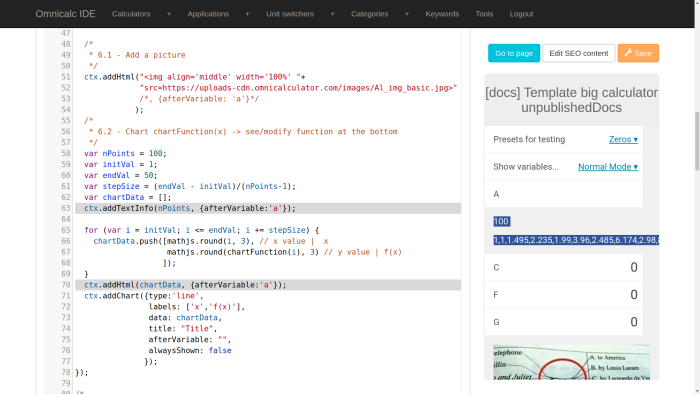
Example of using ctx statements for debugging.
First thing you need to do is locate the suspect. That would be the part of your code that is not being executed, anywhere you declare of modify any variable involved in the problem… You should be able to tell roughly where is the code that’s causing the problem.
Once you have identified the suspects, we need to interrogate them. In our case we want to know what are their values and properties. To do this we can use ctx methods, namely ctx.addHtml and ctx.addTextInfo.
You might not be able to fix the issue right again, but you can keep investigating and interrogating new suspects until you find a fixable point.
Tip
You can use typeof([variable]) to see what is the variable type of [variable]. Wrong variable types can cause unexpected problems when operating with them or testing conditions.
Once you find where the mistake was made, you can rectify it. If the problem still persists it just means that you caught another error that wasn’t showing up yet. That’s good news, you’re getting closer to the final fix, just repeat the procedure until your calculator learns who’s the boss and starts obeying your commands.
The calculator disappeared (console.log the sh** out of your code)
Sometimes, however, the whole calculator disappears rendering our ctx-based methods ineffective. Sometimes it might display an error message and other not even that. Either way the procedure is always the same.
Note
After a Javscript error like the ones mentined here you will need to restart the calculator. Simply reload the page (be careful you might lose your changes) or simply modify a character on the customJS text editor (adding/removing a space will do).
First open the developer options on your browser (typically by pressing F12). Then navigate to the “Console” and look for error messages (generally highlighted in red). Once you find the error message try to make sense of it. You might know what’s wrong right away or you might need to consult Google first, but most of the times you’ll get some good information about what went wrong.
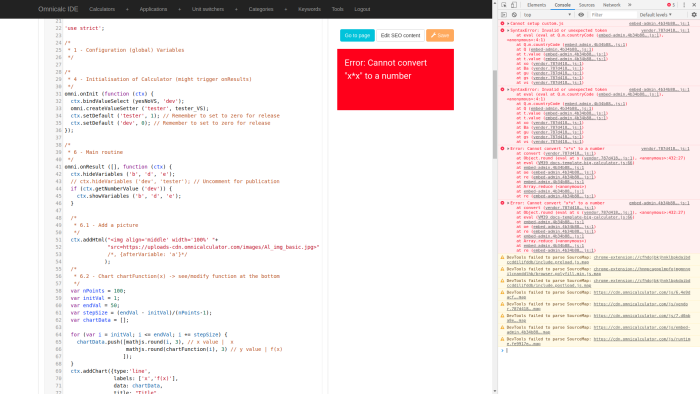
Developer console showing full error message when the calculator disappears.
If, however, you are still clueless about what is actually wrong (happens more often than you’d think) we need to try a different approach. We can recreate the ctx trick to see the state of variables. This you would need to use console.log([variable]) to check the state of [variable] so that you it gets displayed on the developer console instead of in the calculator. Search for the source of your problem and you should be golden.
Tip
In the developer console you can interact with objects and structured variables by clicking them. This can give you very useful information if you know what to look for.
If you decide to use more than one console.log statement (and you should for complex code) try labelling each output by adding a string output as another console.log just before the main ones. You can also use the + symbol to concatenate strings if you’re only interested in the value of a variable.
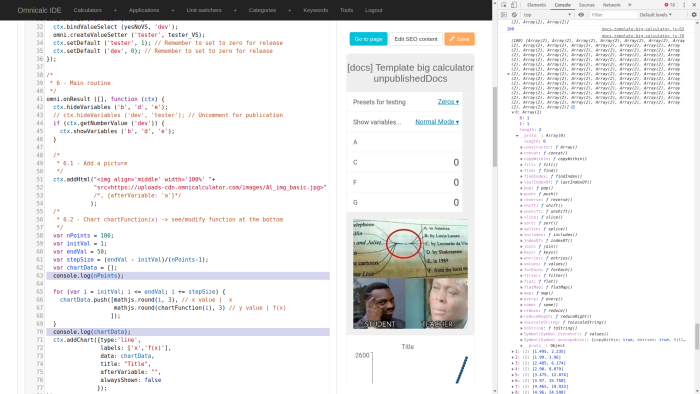
Using console.log statements for debugging.
Warning
NEVER publish a calculator with console output on the code. Not only does it look bad, but you will suffer the rage of the developers… Trust me, you don’t want to know what evil thoughts go through the minds of those who created BB.
The ace up your sleeve (temporary delete code)
There are days when you don’t seem to be able to find out where the problem is. Or maybe you just can’t be bother adding ctx or console.log statements. In these situations, there is another way. A more rudimentary way to find out where the source of your error is can be to simply start deleting code.
Deleting code is down right painful, and also terribly stupid if you plan on rewriting it later, so you can get the same effect by commenting parts of it. Use // for commenting line by line and use /* [code] */ to comment blocks of code. Simply comment any parts of your code that seem suspicious and see if the error is gone. If it is, the source is in the piece you just commented. You can repeat this process until you find the command that is causing all the troubles.
Remember to leave uncommented the essential parts so that the untouched code can still be executed. Sometimes it’s necessary to replace a big chunk of code you just commented with a simple dummy statement to avoid incompatibilities.
Warning
Be careful when commenting code not to introduce new errors. The idea is find the mistake not to create new ones trying to make your mutilated code to work.
A clear example of this are user defined functions. In this cases the trick is to comment the code inside the function and create a dummy output of the same type as the real one. If your function returns decimal numbers try returning a fixed decimal value to see if the program would run fine with the correct type of output.
When all hope is lost (summoning the oracle)
If after trying all the above strategies you still haven’t succeeded -I can’t stress this enough- Don’t Panic!. It’s time to summon the power of the oracle, the hive-mind of the #calculatorians channel. Legend has it that this channel contains the collective knowledge of all past an present calculatorians.
We are all willing to help, so the best idea is to post directly on the channel. If you need to talk with one person directly for some reason try starting with Dominik or Alvaro as they have enough experience and customJS-skills to solve your problem or point you in the right direction. Just remember: there’s no shame in having problems or asking for help; we’ve all been n00bs and the only way to improve is by asking questions.
We will soon have a quick guide on how to ask better questions when you need help. For the time being just make sure you clearly know what you want to do, explain the problem properly and give as much information as possible regarding what you have tried and what unwanted behaviour you get.
A word on prevention
The best defence is a good offence. For calculatorians this means a few simple things. Plan before you right your code. Go one step at a time. And save your progress so that you always have a working version to go back to. If you follow this simple principles you will still get problems, that’s unavoidable, but they will be fewer and easier to solve. It’s, once again, all about dat sick mindset, dude
Footnotes
| [1] | Yes, I’m looking at you Steve ;) |